Admin Account Permission Exclusions#
Customers who wish to create new AWS Users or Roles are prevented from doing so unless they use the Customer_Admin_PermissionBoundary Permission Boundary.
See below for more information. In addition, there are Explicit Denials that apply to all AWS Users and Roles. This is also described below.
Important
When using some AWS wizards to create services, the wizard will try to create a Role. Due to the limitations discussed below, the wizard will fail. When encountering this situation, you must manually create the Role with the proper permissions, and attach the permission boundary discussed below. Then, in the wizard, you need to pick the Role you created.
Standard Customer Administrator Role#
The standard CU Boulder AWS Account Baseline sets up a powerful AWS Role for use by the administrators in the customer department. This Role will generally be used to set up new IAM Roles and to deploy basic infrastructure, but should be treated similarly to other administrative accounts (think root or Administrator accounts) and only used when it’s privileges are needed. Please consider the principle of least privilege when managing your accounts.
In order to ensure that this role is not breaking components deployed as part of the CU Boulder standard AWS Account Baseline there are certain restrictions on what this role can perform.
Outside of these restrictions, the Customer Admin role will have full administrative privileges.
Actions Explicitly Denied#
All Users, including Customer Administrators, automatically have Explicit Denial of the following actions:
Changes to OIT Cloud Admin Roles, Users, Policies, and Groups
Using AWS CloudTrail
Using AWS GuardDuty
Changes to AWS Config
Changes to Default Account Password Policies
Creating or Deleting Account Aliases
Creating, Updating, or Deleting SAML Provider Settings
Permission Boundary (limits permissions of new users or roles created by Customer Admin)#
Creation of new Users and Roles by a Customer Admin Role is only allowed if the Permission Boundary is attached at the creation of the User or Role.
Permission Boundary is a policy created by us in your account named Customer_Admin_PermissionBoundary.
New users and roles created with this permissions boundary are subject to the same explicit restrictions listed above. They are also explicitly denied the ability to to Create/Update any other AWS Roles/Users
Attaching Permission Boundary#
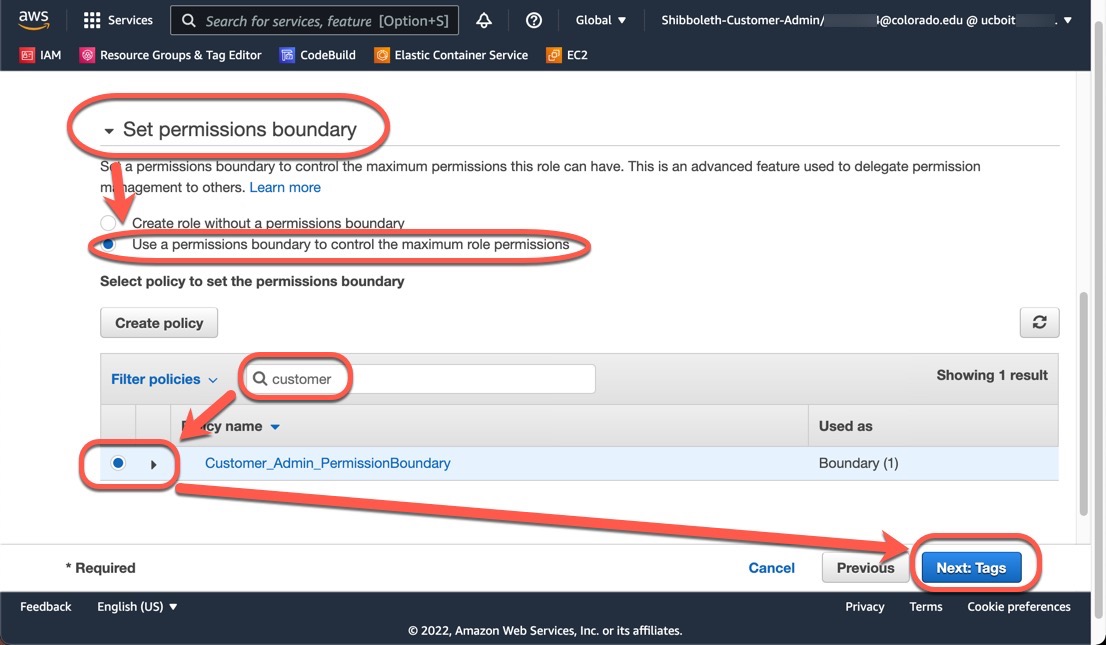
You must attach the Customer_Admin_PermissionBoundary permissions boundary when creating a new IAM user or role.
During the Create role or Create user wizard:
On Step 2, expand Set permissions boundary.
Select Use a permissions boundary to control the maximum role permissions.
Search for
Customer_Admin_PermissionBoundary.Select
Customer_Admin_PermissionBoundary.Select Next: Tags to continue.